
Introduction of QR Code Generator Tool:
This QR Code Generator generates QR codes based on user input, allowing you to quickly create QR codes for URLs, text, vCards, emails, and SMS messages.
Steps to Use this Tool:
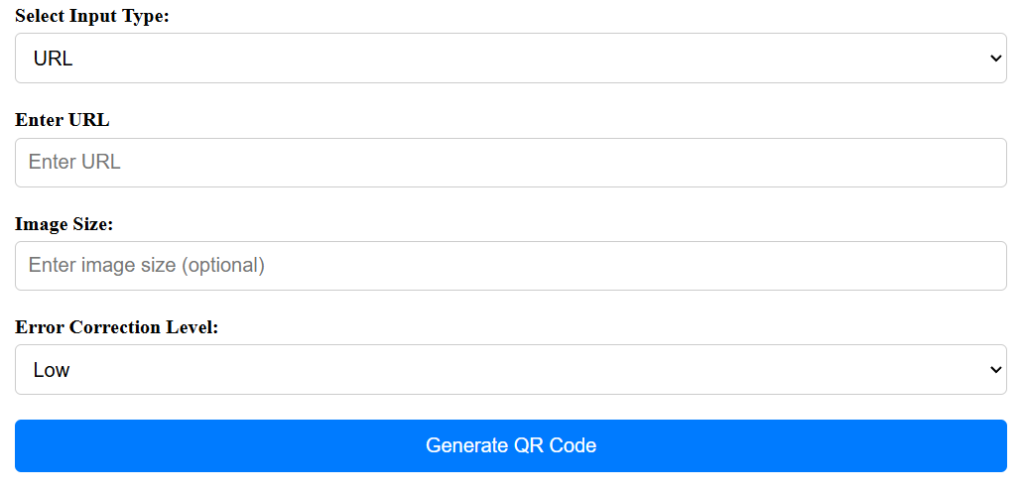
- Select the input type from the dropdown menu (e.g., URL).
- Enter the corresponding data for the selected input type (e.g., URL).
- Optionally, specify the image size and error correction level.
- Click the “Generate QR Code” button.
- The generated QR code will appear below the button.
Functionality of the Tool:
- Supports generating QR codes for different types of data inputs, including URLs, text, vCards, emails, and SMS messages.
- Provides options to customize the image size and error correction level of the QR code.
- Dynamically generates the QR code based on the user’s input and chosen settings.
- Offers a user-friendly interface for generating QR codes quickly and efficiently.
- Utilizes the QR Server API to generate QR codes on the fly.
Benefits of Using this QR Code Generator Tool:
- Simplifies the process of creating QR codes for various purposes, such as sharing URLs, contact information, or messages.
- Offers flexibility in customizing the size and error correction level of the QR codes to suit different use cases.
- Provides a convenient way to generate QR codes without the need for specialized software or technical expertise.
- Enables users to quickly generate QR codes for marketing materials, product packaging, event promotions, and more.
- Facilitates seamless integration of QR codes into websites, social media profiles, printed materials, and digital content.
FAQ QR Code Generator:
- What types of data inputs are supported by this tool?
- This tool supports generating QR codes for URLs, text, vCards, emails, and SMS messages.
- Can I customize the size of the generated QR code?
- Yes, you can specify the image size in pixels to adjust the size of the QR code.
- What is error correction level, and why is it important?
- Error correction level determines the amount of redundancy added to the QR code to ensure its readability, even if it’s partially damaged or obscured. Higher error correction levels provide better resilience against damage but result in larger QR codes.
- Can I use the generated QR code for commercial purposes?
- Yes, you can use the generated QR code for both personal and commercial purposes without any restrictions.
more