
1. Steps to Use the Distance Calculator:
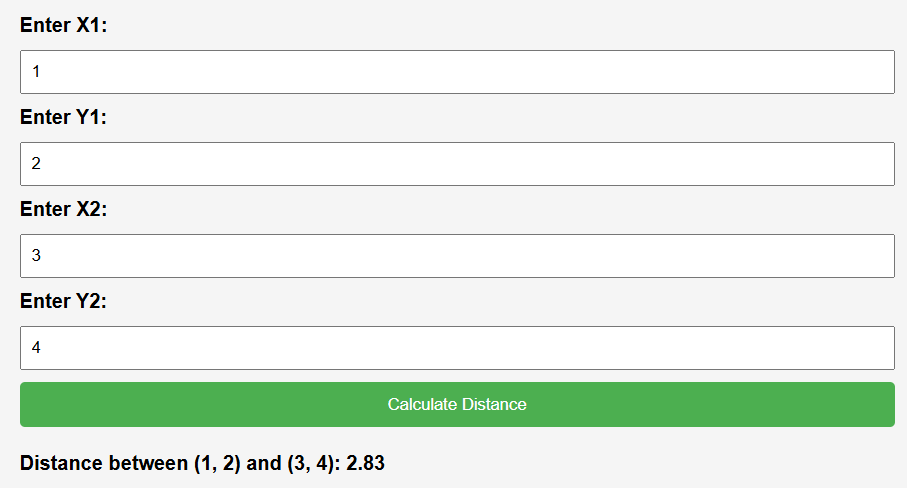
- Enter Coordinates: Input the coordinates of the first point in the “X1” and “Y1” fields, and the coordinates of the second point in the “X2” and “Y2” fields.
- Calculate Distance: Click the “Calculate Distance” button to compute the distance between the two points.
- View Result: The calculated distance will be displayed below the button in the “Distance between” format, showing the coordinates of both points and the calculated distance.
2. Information About the Distance Calculator:
- Purpose: The Distance Calculator determines the distance between two points in a two-dimensional Cartesian coordinate system.
- Functionality: It utilizes the Euclidean distance formula to compute distances, providing accurate results.
- Input Format: Accepts numerical values for the coordinates, allowing users to input coordinates in any standard format.
- Output Format: Presents the calculated distance with two decimal places for precision, along with the coordinates of the points involved.
3. Benefits of Using the Distance Calculator:
- Accuracy: Utilizes a well-established mathematical formula to ensure precise distance calculations.
- Convenience: Offers a user-friendly interface for easily inputting coordinates and obtaining distance results.
- Versatility: Suitable for various applications, including geometry, navigation, mapping, and more.
- Time-Saving: Provides instant results, eliminating the need for manual distance calculations.
4. Frequently Asked Questions (FAQ):
- Q: Can this tool calculate distances in three-dimensional space?
- A: No, this calculator is specifically designed for two-dimensional Cartesian coordinates.
- Q: Are negative coordinates supported?
- A: Yes, negative coordinates are supported, allowing for calculations involving points in any quadrant.
- Q: Can I use this tool to find the distance between two addresses?
- A: No, this tool calculates distances based on numerical coordinate values, not addresses.
- Q: How accurate are the results?
- A: The results are accurate to two decimal places, ensuring a high level of precision in the calculated distances.
More